




Membership
Monetize exclusive content through subscriptions
2.2K +
Installs
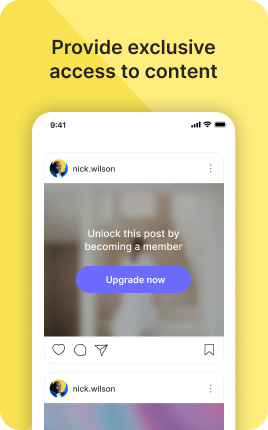
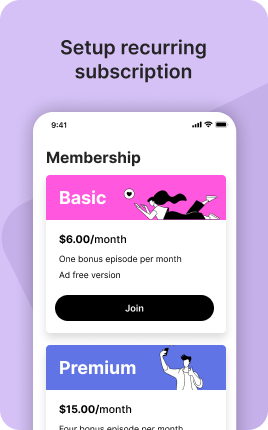

The Membership Block turns one-time visitors into recurring subscribers. Visitors choose a tier (typically free, monthly, annual), enter payment, and unlock the content or perks tied to that level — gated posts, members-only PDFs, exclusive Discord access, behind-the-scenes content, weekly office hours. Recurring revenue is dramatically more valuable than one-time sales: a $10/month membership at 200 subscribers is $24,000/year of compounding revenue, far harder to replicate with sporadic product launches. The Membership Block makes that possible without needing Patreon, Substack, or any third-party platform.
Use cases
Concrete patterns we see UniLink creators apply most. Pick the closest to your situation as a starting point.
Creator membership tiers
Free tier (newsletter, basic posts), Standard tier ($5-10/mo for ad-free, weekly extras), Premium tier ($25/mo for office hours and full backlog access). The Membership Block manages tier-gating, payments, and renewals automatically — you focus on creating content the tiers earn.
Gated course modules and cohorts
Educators selling ongoing programs — monthly modules released to subscribers, weekly Q&A calls, private community access. The Membership Block keeps the access predictable: pay this month, you see this month's drop. Stop paying, future content locks (but past purchases remain).
Patreon-style supporter tiers
Independent creators replacing Patreon with their own infrastructure. Same tier model, same recurring billing, but you keep 100% of payment-processor-net revenue and own the relationship with subscribers (their email, not Patreon's subscriber data).
Software and SaaS subscriptions
For software products you sell directly, the Membership Block handles monthly/annual billing, plan changes, and cancellations. Combined with feature flags in your app, this lets you sell SaaS without needing a full Stripe Subscriptions integration in your codebase.
How to add this block
From marketplace install to live on your link in bio. Each step takes seconds; the writing is what takes time.
- 1
Add the block from the marketplace
Open your UniLink dashboard, pick the page you want to sell on, and add the block from the marketplace. It appears empty so you can populate it with your own products or offers.
- 2
Connect your payment provider
UniLink supports Stripe, PayPal, WayForPay, and Fondy. Connect at least one in Settings → Payments so the block can collect money. Without this step the block is preview-only.
- 3
Add product details that sell
For each item, write a short outcome-led title, a benefit-led description, set the price, and upload at least one photo. Photos drive ~60% of conversion on link-in-bio commerce — invest in them.
- 4
Set inventory and shipping rules
If you ship physical goods, define shipping zones and rates. For digital and service products, mark them as "no shipping required" so the checkout skips the address step.
- 5
Publish and watch the dashboard
Hit publish and the block goes live. UniLink Analytics shows views, add-to-cart events, and revenue per product so you can iterate on what converts and what does not.
Best practices that move the needle
Small changes in writing or curation that consistently improve conversion.
One hero offer per block
Visitors decide in seconds. Lead with your strongest offer — bestseller, new launch, or biggest discount — and let the rest support it. A wall of equal items competes with itself.
Real photos beat stock every time
Phone-shot product photos out-convert generic stock images by 2-3x on link-in-bio. Visitors trust what looks real. Avoid stock unless you sell stock photography.
Price clearly, no hidden costs
List the all-in price including taxes where the law allows. Surprise costs at checkout are the #1 reason visitors abandon link-in-bio carts.
Test offers monthly
Rotate which offer leads the block every month. Track which version drives the highest revenue per visitor in Analytics. Stale offers go stale fast on social.
Frequently asked questions
What is a Membership Block in a link in bio?
A Membership Block is a tiered subscription system embedded on your link in bio. Visitors pick a tier, enter payment, and gain access to gated content or perks tied to that tier (e.g., members-only posts, exclusive Discord, weekly calls). The block handles recurring billing, tier upgrades and downgrades, and access control automatically.
How does it differ from one-time product sales?
One-time products (Shop Block, Single Product Block, Digital Products Block) are bought once and the buyer owns it forever. Memberships are recurring subscriptions — visitors pay monthly or annually for ongoing access to content, services, or perks. Cancel and access ends; renew and access continues. Different revenue model, different content cadence required.
Can I have multiple tiers?
Yes. Common pattern: free, $5/mo, $25/mo. Each tier has its own benefits and access level. Visitors can upgrade or downgrade at any time, with prorated billing handled automatically. 3-tier structures convert best — anchoring effect makes the middle tier feel like good value.
How is gated content delivered?
When a visitor subscribes, they get access to specific pages or blocks marked as members-only. The Membership Block stores their access state, so subsequent visits skip the paywall and load the gated content directly. For external content (Discord, Slack, private repos), the block can email invitations on subscription.
What happens when someone cancels?
Their access continues until the end of the current billing period (paid through Day 30, access through Day 30). After that, gated content locks but past purchases or downloads remain accessible. The cancellation flow includes optional "downgrade instead?" prompts to retain price-sensitive subscribers at lower tiers.
Which payment providers does it support?
Stripe is the primary subscription provider — robust handling of recurring billing, dunning (automatic retry on failed cards), proration, and tax. PayPal subscriptions are supported with some limitations. WayForPay and Fondy support recurring billing for one-time products converting to subscriptions; check current docs for full subscription parity.
Is the Membership Block free on UniLink?
The Membership Block is a PRO-plan feature because of the complexity of managing recurring billing, dunning, and access control reliably. Most creators with active memberships are far past the threshold where PRO pays for itself within the first month. Free creators can use Single Product Block for one-time community access if they prefer not to upgrade.
Related blocks
Pair this block with these to build a complete page on your link in bio.
Ready-to-use apps in the marketplace
Try ready-made page templates built around this block — install with a single click.
Membership
Create a free or paid subscription to your content
Coaching Intake Quiz
Qualify clients before the first call, not during it
Services
Offer your services — receive requests via email notification
Shoutout
Let fans order a personalized video message from you for a fee
Consultation
Offer paid consultations — let clients describe their needs
Custom Work
Accept custom orders — art, design, writing, music or any service
Audio Inbox
Let fans send you personalized voice messages
Ready to add this block?
Drop it on any UniLink page in under a minute. Customize copy, visuals, and order without touching code.
Add to UniLink — free