




Digital
Sell digital products like .pdf files, ebooks, presets
2.1K +
Installs
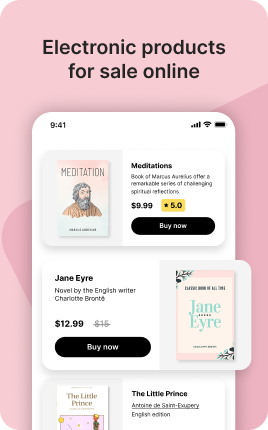
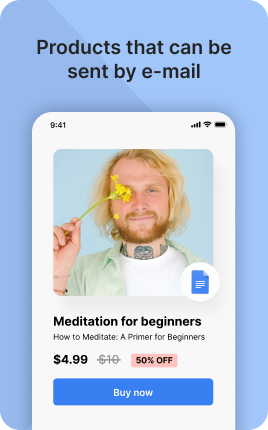
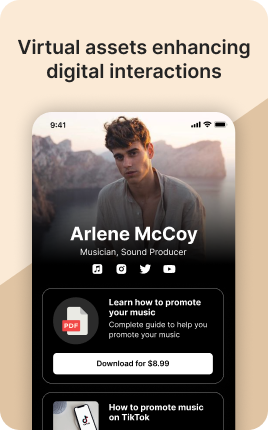
The Digital Products Block is built for creators who sell downloadable goods — PDFs, presets, templates, ebooks, audio packs, video courses, plug-ins, fonts. There is no shipping, no inventory, no physical fulfillment to worry about; the moment payment clears, the buyer gets a secure download link via email. Margins on digital products are typically 80-95% net of payment processor fees, which makes this one of the highest-leverage blocks in UniLink — a single $30 template can earn the same as fulfilling $300 of physical goods, without the warehousing.
Use cases
Concrete patterns we see UniLink creators apply most. Pick the closest to your situation as a starting point.
Templates and design files
Notion templates, Figma kits, Canva templates, design system files. Sell once, deliver instantly, scale infinitely. The Digital Products Block sends a unique download link per buyer that can be revoked or rate-limited, so license enforcement is built in.
Photographer presets and LUTs
Lightroom presets, Capture One styles, video color LUTs. Bundle 8-12 presets at $20-40 and you have a passive income product that sells on autopilot to your existing audience. No fulfillment, no shipping, just instant downloads.
Ebooks, guides, and PDFs
How-to guides, recipe books, business playbooks, mini-courses in PDF form. The Digital Products Block delivers them instantly to buyers and tracks which links were used so you can spot abuse (e.g., one link downloaded 100 times in 24 hours).
Audio packs and music samples
Producers, sound designers, podcasters — sell sample packs, stingers, intro music, sound effects. The block handles ZIP delivery for multi-file packs and provides license terms to buyers automatically along with the download.
How to add this block
From marketplace install to live on your link in bio. Each step takes seconds; the writing is what takes time.
- 1
Add the block from the marketplace
Open your UniLink dashboard, pick the page you want to sell on, and add the block from the marketplace. It appears empty so you can populate it with your own products or offers.
- 2
Connect your payment provider
UniLink supports Stripe, PayPal, WayForPay, and Fondy. Connect at least one in Settings → Payments so the block can collect money. Without this step the block is preview-only.
- 3
Add product details that sell
For each item, write a short outcome-led title, a benefit-led description, set the price, and upload at least one photo. Photos drive ~60% of conversion on link-in-bio commerce — invest in them.
- 4
Set inventory and shipping rules
If you ship physical goods, define shipping zones and rates. For digital and service products, mark them as "no shipping required" so the checkout skips the address step.
- 5
Publish and watch the dashboard
Hit publish and the block goes live. UniLink Analytics shows views, add-to-cart events, and revenue per product so you can iterate on what converts and what does not.
Best practices that move the needle
Small changes in writing or curation that consistently improve conversion.
One hero offer per block
Visitors decide in seconds. Lead with your strongest offer — bestseller, new launch, or biggest discount — and let the rest support it. A wall of equal items competes with itself.
Real photos beat stock every time
Phone-shot product photos out-convert generic stock images by 2-3x on link-in-bio. Visitors trust what looks real. Avoid stock unless you sell stock photography.
Price clearly, no hidden costs
List the all-in price including taxes where the law allows. Surprise costs at checkout are the #1 reason visitors abandon link-in-bio carts.
Test offers monthly
Rotate which offer leads the block every month. Track which version drives the highest revenue per visitor in Analytics. Stale offers go stale fast on social.
Frequently asked questions
What is the Digital Products Block in a link in bio?
The Digital Products Block is a specialized version of the Shop Block built for downloadable goods — files that buyers receive instantly via email when payment clears. Common digital products include PDFs, ZIP archives, video courses, audio packs, design templates, fonts, and software. No shipping, no inventory, no physical fulfillment required.
How does delivery work?
Upload your file (or paste an external URL) when configuring the product. The moment payment clears, UniLink sends the buyer an email with a secure, time-limited download link unique to their order. The link can be configured to expire after a set number of downloads or after a set time, preventing license abuse.
What file types and sizes are supported?
PDF, ZIP, MP3, WAV, MP4, MOV, PNG, JPG, EPS, AI, PSD, FIG, OTF, TTF — virtually any file format. Free plans support files up to 100MB; PRO plans support up to 5GB per file. For larger products like full video courses, host the file externally (Vimeo, S3, Wistia) and paste the URL — UniLink emails the URL on purchase, the host handles delivery.
How do I prevent piracy?
Several layers of protection: download links expire after a configurable time or download count, each link is unique per buyer (so you can revoke individual abuse), and buyer email is embedded in PDF metadata for traceability. Determined pirates will always find a way; the goal is to make casual sharing inconvenient enough that most buyers play fair.
Can I bundle multiple files into one product?
Yes. Upload multiple files and UniLink delivers them all to the buyer (either as a ZIP or as separate links in the same email). Bundles work especially well for "complete kit" offerings — Notion template + how-to PDF + walkthrough video as a single $50 product.
How are taxes and VAT handled?
EU VAT and US sales tax compliance is on PRO plans — UniLink calculates and collects the correct amount based on buyer location and reports it for your filings. On free plans, you collect a single flat price and handle tax obligations on your own. For most early-stage creators, the free plan is sufficient until VAT thresholds are crossed.
Is the Digital Products Block free on UniLink?
Yes for basic functionality on the free plan, with file size and monthly transaction limits. PRO plans lift limits, add abandoned-cart recovery, discount codes, EU VAT compliance, and license-key generation for software products. For most beginning creators, free-tier is enough to start.
Related blocks
Pair this block with these to build a complete page on your link in bio.
Ready to add this block?
Drop it on any UniLink page in under a minute. Customize copy, visuals, and order without touching code.
Add to UniLink — free