




Promobar
Customizable bar at the top of page
4.4K +
Installs
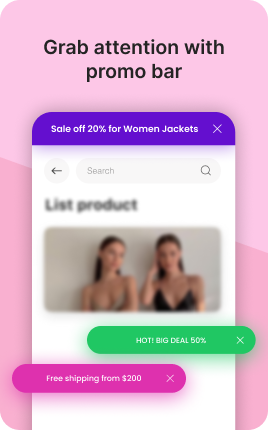
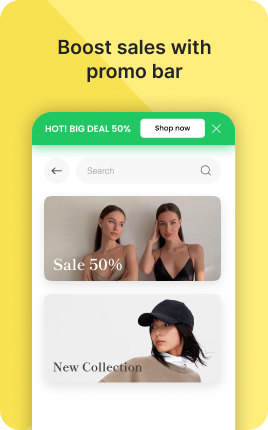
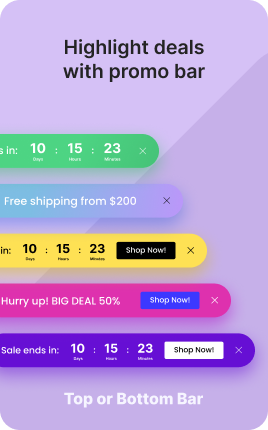

The Promo Bar Block is a sticky announcement banner that runs across the top of your link in bio — a thin colored strip with text and an optional CTA button. Unlike the Banner Block (which lives in the page flow), Promo Bar stays visible as visitors scroll, persistently nudging them toward whatever you're promoting. Use it for time-limited messages: a sale ending soon, a new launch, an event registration deadline. The persistence is its strength — and its risk if the message is permanent and irrelevant to most visitors.
Use cases
Concrete patterns we see UniLink creators apply most. Pick the closest to your situation as a starting point.
Limited-time sale countdown
"Save 20% — ends Sunday" with a countdown timer in the promo bar. The persistent visibility plus countdown maximizes conversion during the campaign window.
Launch announcement
"New collection drops Friday" — keeps the upcoming event top of mind regardless of which block on the page visitors are reading. Especially powerful when launches are time-sensitive.
Free shipping threshold
"Free shipping over $50" — the persistent reminder lifts average order value because visitors see the threshold while shopping the Shop Block below.
Important context or warning
"Office hours: M-F only — DM for emergencies" or "Currently booking for 2026" — sets expectations clearly. Visitors who would otherwise message and wait now know what to expect.
How to add this block
From marketplace install to live on your link in bio. Each step takes seconds; the writing is what takes time.
- 1
Add the block from the marketplace
Open your UniLink dashboard, pick the page you want to sell on, and add the block from the marketplace. It appears empty so you can populate it with your own products or offers.
- 2
Connect your payment provider
UniLink supports Stripe, PayPal, WayForPay, and Fondy. Connect at least one in Settings → Payments so the block can collect money. Without this step the block is preview-only.
- 3
Add product details that sell
For each item, write a short outcome-led title, a benefit-led description, set the price, and upload at least one photo. Photos drive ~60% of conversion on link-in-bio commerce — invest in them.
- 4
Set inventory and shipping rules
If you ship physical goods, define shipping zones and rates. For digital and service products, mark them as "no shipping required" so the checkout skips the address step.
- 5
Publish and watch the dashboard
Hit publish and the block goes live. UniLink Analytics shows views, add-to-cart events, and revenue per product so you can iterate on what converts and what does not.
Best practices that move the needle
Small changes in writing or curation that consistently improve conversion.
One hero offer per block
Visitors decide in seconds. Lead with your strongest offer — bestseller, new launch, or biggest discount — and let the rest support it. A wall of equal items competes with itself.
Real photos beat stock every time
Phone-shot product photos out-convert generic stock images by 2-3x on link-in-bio. Visitors trust what looks real. Avoid stock unless you sell stock photography.
Price clearly, no hidden costs
List the all-in price including taxes where the law allows. Surprise costs at checkout are the #1 reason visitors abandon link-in-bio carts.
Test offers monthly
Rotate which offer leads the block every month. Track which version drives the highest revenue per visitor in Analytics. Stale offers go stale fast on social.
Frequently asked questions
What is a Promo Bar Block in a link in bio?
A Promo Bar Block is a thin sticky banner at the top of your link in bio that displays a short message and optional CTA. Unlike the Banner Block which lives in page flow, Promo Bar stays fixed at the top so visitors see it regardless of scroll position.
How is it different from the Banner Block?
Banner Block is a hero section in the page flow — visitors see it once at the top and then scroll past. Promo Bar Block is sticky — it follows them as they scroll. Use Banner for "set the tone of the page"; use Promo Bar for "this message must stay visible".
Can visitors dismiss the promo bar?
Yes if you enable the dismiss option. Configurable per Promo Bar — for time-critical messages, leave dismiss off; for less critical messages, allow dismissal to respect visitor attention. Once dismissed, the bar stays hidden for that visitor for a configurable period (24 hours, 7 days).
Should I always have a Promo Bar?
No. Persistent promotion fatigues visitors. Use Promo Bar for time-limited or genuinely important messages, then remove it when the moment passes. A bio with a permanent generic Promo Bar (e.g., "Welcome!") is worse than one with no bar at all.
Is the Promo Bar Block free on UniLink?
Yes. The Promo Bar Block is included on every UniLink plan, including the free tier. PRO plans add advanced features like countdown timers and audience-segmented messages.
Related blocks
Pair this block with these to build a complete page on your link in bio.
Ready to add this block?
Drop it on any UniLink page in under a minute. Customize copy, visuals, and order without touching code.
Add to UniLink — free