




Tips & Donations
Add a virtual tip jar or donation button
4.9K +
Installs
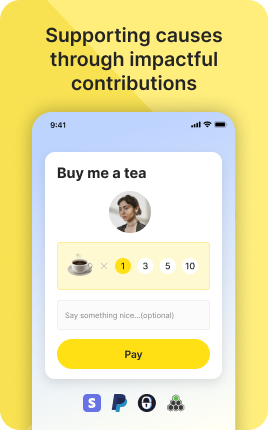
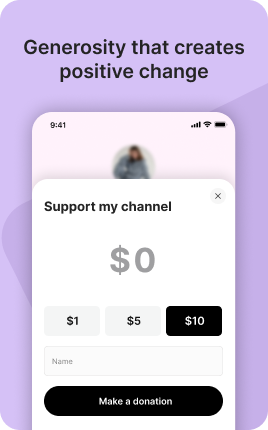
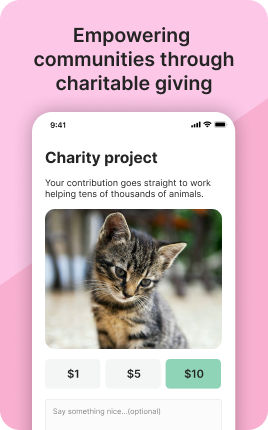
The Tips & Donations Block lets visitors support you with one tap — choose a preset amount ($3, $10, $25), enter a custom amount, or set up a small recurring donation. It is the lowest-friction way to accept money from people who appreciate what you do but don't need a product in exchange. Common use cases: open-source maintainers, creative makers, podcast hosts, public-good projects, freelance journalists, charities. Most tippers give $5-15; the conversion comes from making the tip path so obvious and easy that visitors don't need to think about it.
Use cases
Concrete patterns we see UniLink creators apply most. Pick the closest to your situation as a starting point.
Creator and content support
Podcasters, YouTubers, free newsletter writers — accept tips from listeners and readers who want to support free work. Three preset buttons ($3 / $10 / $25) plus "Other" as a fallback covers most tippers without overwhelming them with input fields.
Charitable and cause-based fundraising
Local charities, mutual aid funds, project fundraisers — the Tips & Donations Block accepts contributions toward a goal, optionally with a progress bar showing how close you are. Transparent goals lift donation rates because visitors see their contribution as part of a movement, not a one-off transfer.
Open source and community projects
Software maintainers, Wikipedia-style projects, community-organized resources — the block accepts ongoing tips from grateful users. Pair with a clear "What we use the funds for" note so contributors trust the money is going to real work.
Freelance journalism and indie reporting
Independent reporters and writers — accept tips from readers who value the work but don't want a paywall. Combined with a Members Block for premium features, tips become the entry point for free readers and Members the upgrade path for committed supporters.
How to add this block
From marketplace install to live on your link in bio. Each step takes seconds; the writing is what takes time.
- 1
Add the block from the marketplace
Open your UniLink dashboard, pick the page you want to sell on, and add the block from the marketplace. It appears empty so you can populate it with your own products or offers.
- 2
Connect your payment provider
UniLink supports Stripe, PayPal, WayForPay, and Fondy. Connect at least one in Settings → Payments so the block can collect money. Without this step the block is preview-only.
- 3
Add product details that sell
For each item, write a short outcome-led title, a benefit-led description, set the price, and upload at least one photo. Photos drive ~60% of conversion on link-in-bio commerce — invest in them.
- 4
Set inventory and shipping rules
If you ship physical goods, define shipping zones and rates. For digital and service products, mark them as "no shipping required" so the checkout skips the address step.
- 5
Publish and watch the dashboard
Hit publish and the block goes live. UniLink Analytics shows views, add-to-cart events, and revenue per product so you can iterate on what converts and what does not.
Best practices that move the needle
Small changes in writing or curation that consistently improve conversion.
One hero offer per block
Visitors decide in seconds. Lead with your strongest offer — bestseller, new launch, or biggest discount — and let the rest support it. A wall of equal items competes with itself.
Real photos beat stock every time
Phone-shot product photos out-convert generic stock images by 2-3x on link-in-bio. Visitors trust what looks real. Avoid stock unless you sell stock photography.
Price clearly, no hidden costs
List the all-in price including taxes where the law allows. Surprise costs at checkout are the #1 reason visitors abandon link-in-bio carts.
Test offers monthly
Rotate which offer leads the block every month. Track which version drives the highest revenue per visitor in Analytics. Stale offers go stale fast on social.
Frequently asked questions
What is a Tips & Donations Block in a link in bio?
A Tips & Donations Block is a low-friction payment widget for accepting one-time tips or recurring donations directly on your link in bio page. Visitors tap a preset amount or enter a custom one, pay, and you receive the tip net of payment processor fees. Built for support and gratitude rather than purchases — there is no product or service exchanged.
How is it different from the Shop or Single Product Block?
Shop and Single Product Block sell products — visitors buy a thing in exchange for money. The Tips & Donations Block accepts contributions where there is no product exchange — the visitor is supporting you, your project, or your cause. The intent and copy of the block reflect this difference, and conversion patterns are also different (smaller average amounts, but higher willingness when the friction is low).
Can visitors tip recurring amounts?
Yes on PRO plans. Visitors can choose "$5/month" or "$25/year" instead of a one-time tip, creating a small recurring revenue stream. Recurring tips are the unsung hero of creator economics — even 50 supporters at $5/month is $3,000/year of compounding revenue, more reliable than one-time spikes.
How are payment processor fees handled?
Stripe and PayPal each charge ~2.9% + $0.30 per transaction. On a $5 tip, that's about $0.45 — meaningful at small amounts. UniLink can optionally show a "cover the fees" checkbox at tip time, and most tippers tick it without thinking. This recovers ~70% of fees on average.
Can I show how much has been raised?
Yes. Optional progress bar with a goal amount ("Help us reach $5,000") and current total. Visible progress dramatically increases donation rates — visitors see their contribution as part of a collective effort. For ongoing tips without a goal, hide the progress bar and just show a "Recent supporters" list as social proof.
Is there a tax-deductible / charity option?
Tips & Donations Block on UniLink is a generic payment widget — it does not issue tax receipts or guarantee 501(c)(3) compliance for US charities. If you are a registered charity that needs tax-receipt issuance, integrate a specialized donation platform (Givebutter, Donorbox, Every.org) and link to it from your link in bio instead. The Tips Block works for un-deductible tips and creator support.
Is the Tips & Donations Block free on UniLink?
Yes for one-time tips on free plans. PRO plans add recurring tips, supporter messaging, and detailed analytics. For most creators starting to accept tips, the free tier is enough to test demand before upgrading.
Related blocks
Pair this block with these to build a complete page on your link in bio.
Ready to add this block?
Drop it on any UniLink page in under a minute. Customize copy, visuals, and order without touching code.
Add to UniLink — free