




Features Block
Show what makes your product, service, or brand different.
4.8K +
Installs
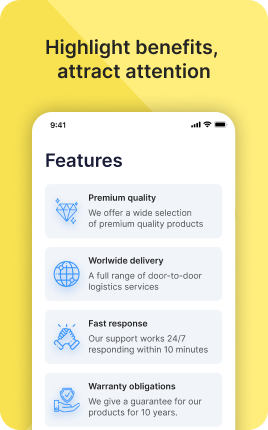
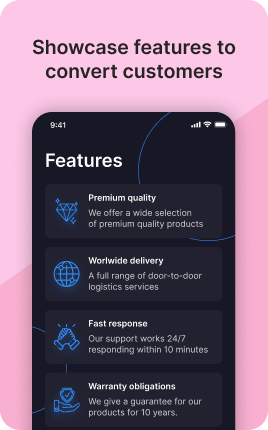
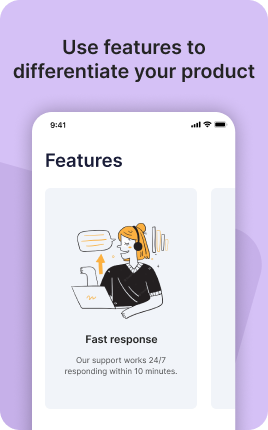
The Features Block turns a paragraph of marketing copy into a scannable grid of benefits. Visitors who land on a link in bio rarely read top-to-bottom — they skim. By breaking your value proposition into three to six short, visual features, you let people make a decision in the five-to-eight seconds they actually spend on the page. Pair each feature with a custom icon or photo, lead with the outcome the visitor gets, and you turn passive scrollers into clicks on your primary call-to-action. The Features Block works equally well for SaaS products, online courses, restaurants, coaches, agencies, and physical goods — anywhere a visitor needs to understand "why you" before they trust you with the next step.
Use cases
Concrete patterns we see UniLink creators apply most. Pick the closest to your situation as a starting point.
SaaS and software products
Highlight three to five product capabilities your free trial users care about most. Pair each feature with a short outcome — "Cut onboarding from 2 hours to 5 minutes" — so prospects understand the practical impact before they sign up.
Online courses and creators
Use the Features Block to preview what students get: number of lessons, lifetime access, downloadable workbooks, community access, certification. This converts curious visitors into enrolled students by removing pre-purchase doubt.
Restaurants and hospitality
Showcase what makes the venue distinctive — wood-fired oven, locally sourced ingredients, dog-friendly patio, walk-ins welcome. Visitors deciding where to eat scan features faster than they read menus, so this block drives reservations.
Coaches and consultants
Translate your methodology into four to six features clients value: number of sessions, response time, deliverables, certifications, industries served. This block builds credibility before the discovery call.
How to add this block
From marketplace install to live on your link in bio. Each step takes seconds; the writing is what takes time.
- 1
Add the block from the marketplace
Open your UniLink dashboard, pick the page where the block makes sense, and add it from the marketplace. It starts with placeholder content you can replace immediately.
- 2
Replace placeholders with real copy
Generic placeholder text is what kills SEO and conversion together. Write your actual copy — short, specific, and in your own voice — before you publish.
- 3
Add visuals that match your brand
Upload icons, photos, or illustrations that fit the rest of your link in bio. Mixed visual styles make the page feel templated — pick a style and stick to it across the block.
- 4
Reorder and curate
Drag items into the order that tells your story best. Hide items you don't need yet rather than deleting — easier to bring back when seasons or campaigns change.
- 5
Publish and iterate
Hit publish and review what visitors actually click in UniLink Analytics. Items that get zero clicks for two weeks are candidates for removal or rewriting.
Best practices that move the needle
Small changes in writing or curation that consistently improve conversion.
Lead with the most important item
The first item in the block gets disproportionate attention. Use it for what matters most — newest content, biggest news, or the strongest social proof. Treat the rest as supporting.
Keep titles short and scannable
Visitors skim — they don't read. Headlines under 8 words convert better. Long titles wrap awkwardly on mobile and lose impact even when they fit.
Refresh on a cadence
Stale content signals a stale brand. Set a recurring reminder — monthly, quarterly — to audit the block and update or remove items that no longer reflect what you do now.
Match visuals to your brand
Inconsistent visual style (mix of stock, illustrations, photos) makes the page feel templated. Pick a visual approach and apply it everywhere in the block.
Frequently asked questions
What is the Features Block in a link in bio?
The Features Block is a dedicated section on your link in bio page where you list the most important benefits, attributes, or selling points of your product, service, or personal brand. Each feature pairs a short headline with a supporting visual or icon, so visitors grasp your value proposition in seconds rather than reading long paragraphs.
How many features should I add to a single block?
Three to six features is the sweet spot for most pages. Below three, the section looks empty and weakens your message. Above six, attention drops and conversions fall. If you have more than six benefits to communicate, group them into themes and use multiple Features Blocks across different pages of your link in bio.
Where should the Features Block go on my page?
Place it directly under the hero or banner — visitors see it without scrolling and immediately understand what you offer. For longer pages, repeat key features near the call-to-action so the reasons to act are visible at the moment of decision.
Should I use icons, photos, or screenshots in the Features Block?
It depends on what you sell. Software and SaaS products convert better with screenshots that prove the feature exists. Service businesses and creators perform better with branded icons or short illustrations that reinforce the brand. Avoid stock photography in this block — it dilutes trust.
How do I write feature copy that converts?
Lead with the outcome the visitor gets, not the technical mechanism. "Booking confirmations sent in 30 seconds" is a feature; "Webhook-triggered email automation" is plumbing. Write in second person ("you"), keep each headline under 8 words, and pair it with a one-sentence supporting line.
Is the Features Block free on UniLink?
Yes. The Features Block is included on every UniLink plan, including the free tier. You can add it to any page, customize the layout, and update the content as often as you need without paying extra.
Can I A/B test different feature lists?
Yes. UniLink supports multiple pages on a single link in bio, so you can publish variations and route traffic with different campaigns or QR codes. Track engagement in the built-in Analytics dashboard to see which set of features drives more clicks and conversions.
Related blocks
Pair this block with these to build a complete page on your link in bio.
Ready to add this block?
Drop it on any UniLink page in under a minute. Customize copy, visuals, and order without touching code.
Add to UniLink — free