




Podcasts
Let customers listen audio books, podcasts
6.1K +
Installs

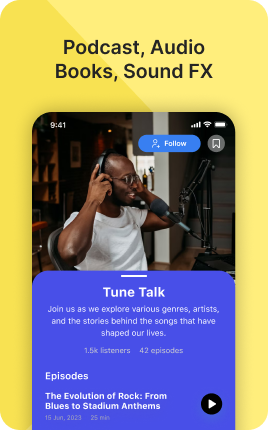
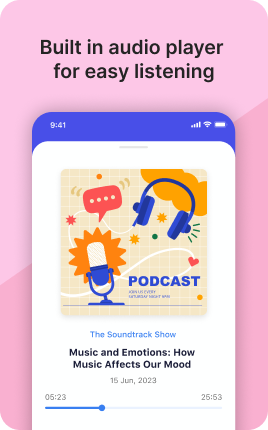
The Podcasts Block embeds podcast episodes directly on your link in bio — latest episode, most popular, or a curated selection. Visitors press play and listen in place, with options to subscribe on the platform of their choice (Apple Podcasts, Spotify, Pocket Casts, Overcast, etc.). For podcasters, the bio embed is a sample-then-subscribe funnel: a visitor who listens to 5 minutes of an episode is far more likely to subscribe than one who only sees a logo.
Use cases
Concrete patterns we see UniLink creators apply most. Pick the closest to your situation as a starting point.
Latest episode embed
Auto-pulled latest episode from your RSS feed. Visitors can sample your latest content and subscribe on their preferred platform with one tap.
Best-of curated list
Manually pick your top 3-5 episodes — listener favorites, "start here" guides, evergreen breakthroughs. New visitors get your strongest content first instead of whatever you released this week.
Multi-platform subscribe links
Apple Podcasts, Spotify, Pocket Casts, Overcast — visitors pick their platform of choice. Don't make them search for your show; show all options up front.
Trailer or pilot episode
For new shows, a single embedded trailer or pilot episode helps visitors decide whether the show is for them. The Podcasts Block makes the decision low-friction.
How to add this block
From marketplace install to live on your link in bio. Each step takes seconds; the writing is what takes time.
- 1
Add the block from the marketplace
In your UniLink dashboard, drop the block onto the page where your audience expects to find your content. Most creators put it directly under the hero.
- 2
Connect or paste your account link
Authenticate the social account if the block supports auto-feed, otherwise paste your profile URL. Auto-feed pulls the latest posts on a schedule — no manual updates.
- 3
Choose layout and post count
Grid, slider, or list — pick the layout that works with your other blocks visually. Show 6-9 most recent posts; more clutters, fewer looks empty.
- 4
Set the call-to-action
Add a clear button below the feed: "Follow on Instagram", "Subscribe on YouTube". Visitors who like what they see should know where to go next without scrolling.
- 5
Publish and watch traffic flow
The block now bridges your link in bio with your platform. Track click-through to your social profile in Analytics and adjust position if it underperforms.
Best practices that move the needle
Small changes in writing or curation that consistently improve conversion.
Show your best, not your latest
Auto-feed shows the latest, but if your latest post is weak, it hurts the bio page. Pin or curate your best 6-9 posts — these set the impression for new visitors.
Match the platform's visual language
Instagram-style square crops, TikTok's vertical aspect, YouTube's thumbnail format — visitors recognize and trust content that looks native. Don't fight the platform's norms.
One platform per block
Mixing Instagram, TikTok, and YouTube in one feed dilutes attention. Use a separate block per platform so visitors see a strong stream of one type instead of a confused mix.
Refresh the call-to-action quarterly
Static "Follow me" gets ignored over time. Rotate to specific CTAs ("New post tomorrow at 3pm", "Live in 2 hours") that signal activity and create urgency.
Frequently asked questions
What is a Podcasts Block in a link in bio?
A Podcasts Block embeds podcast episodes on your link in bio page. It supports Apple Podcasts and Spotify embeds, RSS-fed episode lists, and platform-agnostic subscribe-link rows. Visitors listen in place and subscribe on their preferred platform.
Where do the episodes come from?
You can connect via RSS feed (the standard for any podcast hosted anywhere) or paste individual Apple Podcasts / Spotify episode URLs. RSS is easier — point at your feed once and the block updates automatically.
Can listeners subscribe from the block?
Yes. Each Podcasts Block can include a "Subscribe on..." row with buttons for major platforms (Apple Podcasts, Spotify, Pocket Casts, Overcast, Castro, RSS). Visitors pick their platform of choice without you needing to know which one they use.
Will embedded plays count toward podcast charts?
Embedded plays from your bio do count toward Apple Podcasts and Spotify metrics for your show. They're not the same as in-app plays for chart-position purposes (each platform has its own ranking algorithm), but they contribute to overall stats and listener growth.
Is the Podcasts Block free on UniLink?
Yes. The Podcasts Block is included on every UniLink plan, including the free tier. PRO plans add features like automatic episode filtering by listener count and detailed embed analytics.
Related blocks
Pair this block with these to build a complete page on your link in bio.
Ready to add this block?
Drop it on any UniLink page in under a minute. Customize copy, visuals, and order without touching code.
Add to UniLink — free