




Display a live feed of Instagram content
5.9K +
Installs
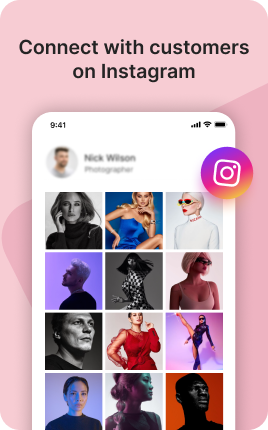


The Instagram Block embeds your Instagram presence directly on your link in bio — recent posts in a grid, a single hero post, or a curated selection of your best work. Visitors browse without leaving your bio, then tap through to follow you on Instagram itself when they're ready. The block bridges your most-trafficked profile (your bio) with your most active platform (Instagram), capturing followers from people who arrived via TikTok, YouTube, or search but should be on Instagram too.
Use cases
Concrete patterns we see UniLink creators apply most. Pick the closest to your situation as a starting point.
Recent posts feed
Auto-fed grid of your last 6-9 Instagram posts. Visitors get a sample of your content quality and visual style without leaving the bio. Click-throughs to follow rise sharply when visitors see content they like.
Curated best-of grid
Manually pick your strongest 6-9 posts to feature instead of auto-feed. Reduces dependence on whatever you happened to post last and lets you curate first impressions for new visitors arriving from other platforms.
Hero single-post embed
Your latest reel or carousel as a single embedded post. Combined with a "Follow on Instagram" CTA, this works as a sample-then-subscribe funnel — see one post, get hooked, follow.
Cross-platform audience capture
Visitors arriving from TikTok or YouTube often follow on multiple platforms. The Instagram Block makes Instagram the obvious next platform to follow when your audience overlaps but exists primarily elsewhere.
How to add this block
From marketplace install to live on your link in bio. Each step takes seconds; the writing is what takes time.
- 1
Add the block from the marketplace
In your UniLink dashboard, drop the block onto the page where your audience expects to find your content. Most creators put it directly under the hero.
- 2
Connect or paste your account link
Authenticate the social account if the block supports auto-feed, otherwise paste your profile URL. Auto-feed pulls the latest posts on a schedule — no manual updates.
- 3
Choose layout and post count
Grid, slider, or list — pick the layout that works with your other blocks visually. Show 6-9 most recent posts; more clutters, fewer looks empty.
- 4
Set the call-to-action
Add a clear button below the feed: "Follow on Instagram", "Subscribe on YouTube". Visitors who like what they see should know where to go next without scrolling.
- 5
Publish and watch traffic flow
The block now bridges your link in bio with your platform. Track click-through to your social profile in Analytics and adjust position if it underperforms.
Best practices that move the needle
Small changes in writing or curation that consistently improve conversion.
Show your best, not your latest
Auto-feed shows the latest, but if your latest post is weak, it hurts the bio page. Pin or curate your best 6-9 posts — these set the impression for new visitors.
Match the platform's visual language
Instagram-style square crops, TikTok's vertical aspect, YouTube's thumbnail format — visitors recognize and trust content that looks native. Don't fight the platform's norms.
One platform per block
Mixing Instagram, TikTok, and YouTube in one feed dilutes attention. Use a separate block per platform so visitors see a strong stream of one type instead of a confused mix.
Refresh the call-to-action quarterly
Static "Follow me" gets ignored over time. Rotate to specific CTAs ("New post tomorrow at 3pm", "Live in 2 hours") that signal activity and create urgency.
Frequently asked questions
What is an Instagram Block in a link in bio?
An Instagram Block embeds Instagram content (recent posts, single posts, or curated grids) directly on your link in bio page. Visitors browse the embedded content in place and tap through to your Instagram profile when they want to follow or engage further.
Does it auto-pull recent posts or do I add them manually?
Both options. Auto-feed connects to your Instagram account and updates with new posts automatically. Manual curation lets you pick specific posts to feature without showing everything you publish. Auto-feed is easier; manual curation keeps quality consistent.
Will this affect my Instagram analytics?
Embedded views may count toward Instagram's reach metrics, depending on Instagram's current algorithm rules. Click-throughs from your link in bio to Instagram count as profile visits. Either way, the bridge from bio to Instagram is a net positive — you get follow conversions you wouldn't otherwise.
Can I customize the layout?
Yes. Choose grid (2x3, 3x3), slider, or single-post layouts. Match the layout to the rest of your bio's visual style — grid works in busy bios, single-post works in minimalist ones.
Is the Instagram Block free on UniLink?
Yes for basic embedding. PRO plans add advanced features like automatic post filtering (only featured posts), engagement metrics, and scheduled feed refreshes.
Related blocks
Pair this block with these to build a complete page on your link in bio.
Ready-to-use apps in the marketplace
Try ready-made page templates built around this block — install with a single click.
Feature your best Instagram media and video or sell your products
Music Links
Share your track on all platforms — Spotify, Apple Music, YouTube
Podcasts
Promote and monetize your podcast episodes
TikTok
Feature your best TikTok video or sell your products with a TikTok page
YouTube
Feature a YouTube video or stream on your page
Music
Embed Spotify, SoundCloud song, playlist or upload your own audio
Twitch
Embed Twitch video or stream on your page
Ready to add this block?
Drop it on any UniLink page in under a minute. Customize copy, visuals, and order without touching code.
Add to UniLink — free